

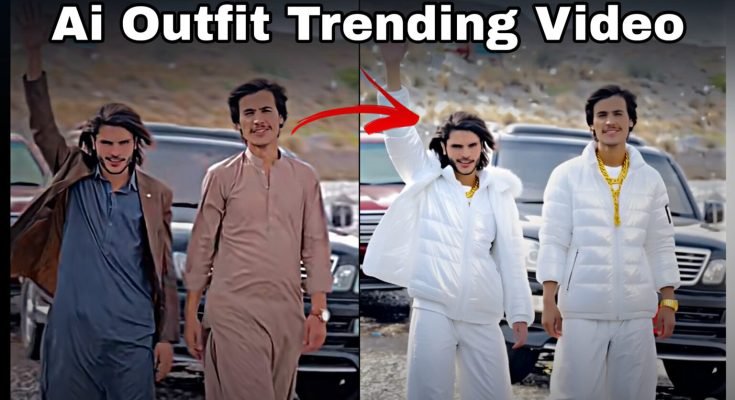
There’s a video format that’s been all over TikTok and Instagram lately — someone stands in one outfit, the camera does a quick spin or transition, and suddenly they’re dressed completely differently, sometimes changing looks five or six times in a single clip. It looks like a fast wardrobe change filmed in real time, but it’s actually AI generating each outfit change after the fact, not an actual costume switch happening between frames.
Recreating this trend doesn’t require a stylist, multiple outfits, or complicated video editing software. A single photo or short clip and the right AI tool can generate the whole sequence, transitions included, letting you jump into a trend that would otherwise take a full day of filming and changing clothes to pull off properly.
Read More: Best New Video Editing App for Android & iPhone
AI Outfit Change Video: Trending Tutorial Guide
There’s a video format that’s been all over TikTok and Instagram lately — someone stands in one outfit, the camera does a quick spin or transition, and suddenly they’re dressed completely differently, sometimes changing looks five or six times in a single clip. It looks like a fast wardrobe change filmed in real time, but it’s actually AI generating each outfit change after the fact, not an actual costume switch happening between frames.
Recreating this trend doesn’t require a stylist, multiple outfits, or complicated video editing software. A single photo or short clip and the right AI tool can generate the whole sequence, transitions included, letting you jump into a trend that would otherwise take a full day of filming and changing clothes to pull off properly.
What “AI Outfit Changing” Actually Means
At its core, this is video or image editing where AI digitally alters or replaces clothing rather than a person physically changing outfits between shots. You film one video, and the AI analyzes your body position, posture, and the lighting in the scene, then generates a new outfit that fits naturally onto that same footage.
The reason this looks so convincing is precisely because the AI accounts for those physical details rather than just pasting a flat clothing image on top. Done well, the transitions look seamless enough that most viewers genuinely can’t tell it wasn’t filmed with real wardrobe changes, which is a big part of why the format has spread so fast and why so many people want to learn how to recreate it themselves.
Why This Trend Has Taken Off
A few things are driving how quickly this format has spread. Fashion and styling content has always performed well on social media — outfit hauls, transformation videos, styling tips all tend to draw attention because they show change and creativity in a visually satisfying way. AI outfit changing takes that same appeal and removes the practical limits: you’re no longer restricted to whatever’s actually in your closet.
Cost and time are another big factor. Buying multiple outfits specifically for one video shoot adds up fast, and coordinating several real wardrobe changes during filming takes considerably more time than most casual creators want to spend. AI-generated outfit changes skip all of that, letting someone try on an entire range of looks without owning a single one of them.
And then there’s the sheer visual appeal of the effect itself. A clean transition where one outfit morphs into another in a fraction of a second has a strong “how did they do that” quality that makes people want to share it, which naturally fuels more people searching for tutorials to figure out how to replicate it themselves.
How These Tutorials Actually Walk You Through It
Most tutorials follow a fairly consistent structure, regardless of which specific app or platform they’re built around:
Filming a base clip. This usually starts with a simple video of the creator standing, walking, or making a small movement — nothing complicated, since the AI needs a clean, steady reference to work from.
Importing into an AI editing tool. Platforms like Runway, CapCut’s AI tools, or dedicated outfit-swap apps are commonly used at this stage, where the base footage gets uploaded for processing.
Selecting and adjusting outfits. The tutorial typically walks through choosing clothing styles, adjusting how textures and fabric render, and fine-tuning lighting so the generated outfit blends naturally with the original footage rather than looking pasted on.
Syncing to music or transitions. More advanced tutorials go a step further, timing the outfit changes to hit specific beats in a soundtrack, which is often what gives the finished video that punchy, satisfying transition effect people associate with the trend.
For someone just starting out, most tutorials are structured to break each of these steps into simple, guided actions rather than assuming any prior editing experience, which is a big part of why the trend has been accessible to such a wide range of creators rather than staying limited to people with technical editing backgrounds.
Why This Matters Beyond Just Trend-Chasing
For fashion-focused creators. Bloggers and influencers can put together diverse lookbooks or styling content without needing to own every piece shown, which meaningfully lowers the barrier to producing varied fashion content regularly.
For everyday content creators. A quick outfit-transition reel is a low-effort but high-engagement format, useful for anyone trying to boost visibility on TikTok or Instagram without needing an elaborate production setup.
For online sellers and small businesses. E-commerce accounts and small clothing sellers can showcase an entire product range in a single video rather than filming separate clips for every item, giving potential buyers a much better sense of what a piece actually looks like worn.
For educators and trainers. Fashion design instructors have started using similar tools to demonstrate styling concepts visually without needing access to a full physical wardrobe for every lesson.
In a broader sense, this technology lowers the barrier for producing polished, varied fashion content — something that used to require an actual wardrobe budget and hours of shoot time now takes a single short clip and an AI tool.
Worth Thinking Through Before You Get Started
As accessible and fun as this trend is, it’s worth being thoughtful about a couple of things before diving in. Using AI to alter someone’s appearance or clothing without their knowledge or consent raises real privacy concerns, so this kind of tool should really only be used on your own footage, or with clear permission if you’re creating content involving someone else. It’s also worth being upfront when a video involves AI-generated changes rather than presenting it as something filmed in real time, particularly for creators building an audience that trusts what they’re showing is authentic.
None of this means the trend is inherently problematic — it’s genuinely a fun, creative use of AI video tools. It just helps to use it thoughtfully, the same way any tool involving someone’s likeness deserves a bit of care.
Getting Started Yourself
- Choose a simple, well-lit base clip — standing or walking works best, since the AI needs a clear, steady view of your body to generate outfits accurately onto.
- Pick an AI editing tool suited to outfit changes, whether that’s a broader platform like Runway or a feature built into an app like CapCut.
- Follow the app’s guided steps for selecting and adjusting outfit styles, paying attention to how lighting and texture settings affect how natural the final result looks.
- Time your transitions to music if you want that punchier, beat-synced effect the trend is known for.
- Review the final result carefully before posting, checking that the outfit changes look natural rather than glitchy or obviously artificial.
Conclusion
What used to require an actual wardrobe, a full day of shooting, and careful editing now takes a single short clip and the right AI tool. The trend is genuinely fun to experiment with, and accessible enough that anyone can try it regardless of editing experience — just worth approaching thoughtfully, especially if anyone besides yourself ends up appearing in the footage.
FAQs
Do I need multiple outfits or a real wardrobe to create this effect?
No, that’s the whole point of the trend — the AI generates the different outfits digitally, so you only need one base clip filmed in whatever you’re actually wearing.
Does the AI actually understand my body position, or does it just overlay a flat image?
It analyzes body structure, posture, and lighting in your footage to generate outfits that fit naturally, which is why the results look realistic rather than pasted on.
What kind of base video works best for this?
A simple, well-lit clip of you standing, walking, or making a small movement tends to give the AI the cleanest reference to work from.
Can I sync the outfit changes to music, or is that added separately?
Some AI tools let you time transitions to specific beats directly during editing, which is what creates that punchy, satisfying transition effect associated with the trend.
Is it okay to use this on footage of other people without asking them first?
No, altering someone’s appearance without their knowledge or consent raises real privacy concerns, so this is best used on your own footage or with clear permission from anyone else involved.
Do I need advanced editing skills to follow these tutorials?
No, most tutorials are designed to walk beginners through each step, from filming the base clip to adjusting outfit settings, without assuming any prior editing experience.
Should I tell my audience that a video uses AI-generated outfit changes?
It’s worth being upfront about it, especially if you’re building an audience that expects to know when something shown isn’t filmed exactly as it appears.
