

You pick up your phone to check one notification, and forty minutes later you’re still scrolling sound familiar? It happens to almost everyone, whether it’s Instagram reels during a study break or WhatsApp groups pulling you in every few minutes. The average Pakistani smartphone user checks their phone dozens of times a day without even realizing it, and most of that time isn’t intentional at all.
Stay Free is built around fixing exactly that. Instead of just showing you a screen time number and leaving you to feel guilty about it, it helps you actually understand where your time goes and gives you tools to cut back on the apps that eat up your day the most whether that’s social media, games, or just endless scrolling with no real purpose behind it.
Read More:Second Line eSIM App for Private, Business Calls
What Stay Free Actually Tracks
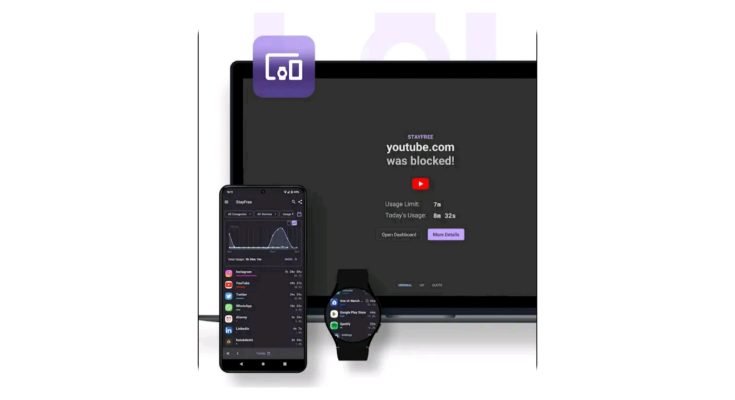
Stay Free is a screen time and apps-usage tracker for Android that does something most people never bother checking manually it shows you, in plain numbers, exactly how much of your day disappears into specific apps. Not a vague “your screen time is up this week” notification, but an actual breakdown: how many minutes on TikTok, how long on Instagram, how much time WhatsApp actually eats up once you add up every notification check.
Seeing that number laid out tends to be the real wake-up call. Most people underestimate their usage by a wide margin until they see it charted out day by day.
What You Can Actually Do With It
Daily usage breakdown. Every apps gets logged with the time spent on it, displayed in a simple chart rather than a wall of numbers you have to interpret yourself.
Set limits per app. Instead of one blanket screen time number for your whole phone, you can cap individual apps say, 45 minutes on Instagram a day and once you hit that limit, the apps steps in with an alert or a block, depending on how strict you want it.
Focus Mode. When you actually need to get work done, study, or just sleep without your phone lighting up every few minutes, Focus Mode locks out the apps you choose for a set stretch of time. No half-measures where the notification still sneaks through the distraction is off the table until the timer runs out.
Usage history over time. Beyond just today’s numbers, you get daily, weekly, and monthly reports, so you can actually see whether your habits are improving or just staying the same despite good intentions.
Data stays on your device. Stay Free doesn’t ship your usage data off to third parties. Everything it tracks stays local, which matters given how much this kind of apps technically knows about your daily habits.
Runs light in the background. A tracking apps that drains your battery defeats the purpose. Stay Free is built to sit in the background without noticeably affecting performance or battery life, even on mid-range phones.
Why This Kind of Tracking Actually Helps
The honest answer is that most people don’t overuse their phones on purpose it happens by default, one notification and one “just five more minutes” at a time. Having actual numbers in front of you changes that. It’s a lot harder to justify two hours a day on short-form video once you see it written down in black and white, day after day.
For students prepping for exams or anyone trying to hit a deadline, Focus Mode alone solves a big chunk of the distraction problem without requiring willpower you might not have left by the end of a long day. And for parents, the same tracking and limit-setting tools work just as well for managing a child’s phone habits setting boundaries around gaming and social apps without turning it into a constant argument over the phone itself.
There’s also a quieter benefit that’s easy to overlook: just being aware of your own patterns tends to nudge behavior on its own, even before you set a single limit. Once you know WhatsApp is eating three hours of your day in five-minute chunks, you start noticing yourself reaching for it out of habit rather than actual need.
Getting Started
- Open the Google Play Store and search for Stay Free.
- Install it and grant the permissions it asks for these are needed for it to actually see which apps you’re using and for how long.
- Open the dashboard and look through your current usage for a few days before changing anything. It’s worth seeing your real baseline first.
- Set limits on the apps that are actually eating your time, rather than capping everything at once.
- Turn on Focus Mode during work, study, or sleep hours, and adjust it as you figure out what schedule actually works for you.
Free vs Premium
The core features — tracking, limits, and Focus Mode are free and cover what most people actually need. The premium version adds an ad-free experience, more detailed analytics for anyone who wants to dig deeper into their usage patterns, a few extra display themes, and priority support. It’s a reasonable upgrade if you’re serious about the data side of things, but not something you need just to get the apps working well for daily use.
Frequently Asked Questions
Does Stay Free work in the background without draining my battery?
Yes, it’s built to run lightly in the background and shouldn’t have a noticeable effect on battery life or phone performance.
Can I set different time limits for different apps?
Yes, you can set a separate daily limit for each apps rather than one overall limit for your whole phone.
What happens once I hit my daily limit on an app?
Depending on how you’ve set it up, Stay Free either sends an alert or blocks access to that apps until the next day.
Is my usage data shared with anyone?
No, your activity data stays stored locally on your device and isn’t shared with or sold to third parties.
Can parents use this to monitor a child’s phone usage?
Yes, the same tracking and limit-setting tools work well for managing how much time kids spend on gaming or social apps.
Is Focus Mode different from just muting notifications?
Yes, Focus Mode actively blocks access to the apps you choose for a set period, rather than just silencing alerts while the apps stay reachable.
Do I need the premium version to use the core features?
No, tracking, limits, and Focus Mode are all available for free. Premium mainly adds deeper analytics, an ad-free experience, and extra themes.
Conclusion
None of this requires cutting your phone out of your life it just puts a number to something most of us have been avoiding looking at too closely. Install Stay Free, let it run for a few days before touching any settings, and use what it shows you to set limits that actually match how you want to spend your time, not just what your notifications have been deciding for you.
