

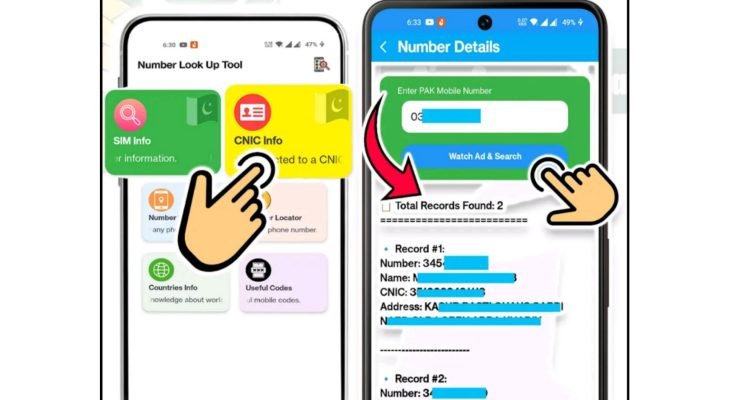
Ever needed to know which network a random number belongs to, or wanted to double-check details about your own SIM without calling customer support and sitting through a voice menu? It comes up more often than people expect verifying an unknown caller, checking SIM registration status, or just confirming which operator a number is on before deciding how to save it. Doing this manually usually means digging through USSD codes or waiting on hold with Jazz, Zong, Ufone, or Telenor support.
A SIM details app skips all of that. It pulls up the information you need — network, region, and other basic SIM data — directly on your phone in a few taps, without needing to remember a single USSD code or explain your issue to a call center agent first.
Read More:Best Name Ringtone Maker App for Android & iOS
SIM Details App: Check SIM Info Instantly
Ever needed to know which network a random number belongs to, or wanted to double-check details about your own SIM without calling customer support and sitting through a voice menu? It comes up more often than people expect verifying an unknown caller, checking SIM registration status, or just confirming which operator a number is on before deciding how to save it. Doing this manually usually means digging through USSD codes or waiting on hold with Jazz, Zong, Ufone, or Telenor support.
A SIM details app skips all of that. It pulls up the information you need network, region, and other basic SIM data directly on your phone in a few taps, without needing to remember a single USSD code or explain your issue to a call center agent first.
What “SIM Details” Actually Refers To
A SIM card carries more information than most people realize — it’s not just the chip that connects your phone to a network. Behind the scenes, every SIM has a set of identifiers and registration data tied to it:
ICCID (SIM number). A long, unique 19–20 digit number printed on the card itself, used to identify the specific SIM chip.
IMSI. A code that links your SIM to your specific network provider and subscriber account, working behind the scenes every time your phone connects to a tower.
MSISDN. Simply put, your actual registered mobile number.
Network provider details. Which operator the SIM belongs to — Jazz, Zong, Ufone, Telenor, or an international carrier if you’re using a foreign SIM.
Activation date. When the SIM was first registered and switched on.
Owner information. In Pakistan, this ties directly to your CNIC, given PTA’s biometric SIM registration requirements — the name, ID, and address linked to that number.
A SIM details app typically surfaces the non-sensitive parts of this — network, region, basic status — rather than exposing full personal registration data, which stays protected on the operator and government side for good reason.
Why Checking This Information Actually Matters
Preventing fraudulent registrations. SIM fraud, where a number gets registered under someone’s CNIC without their knowledge, is a real and ongoing concern in Pakistan. Knowing how many SIMs are actually registered under your identity helps catch this early rather than discovering it after something’s gone wrong.
Staying compliant with registration rules. PTA requires every SIM to be tied to a valid, verified CNIC. Keeping track of your own registered numbers helps you stay on the right side of that requirement, especially if you’ve switched ID cards or updated personal details recently.
Protecting mobile banking and financial apps. Services like Easypaisa, JazzCash, and various banking apps lean heavily on SIM-based verification for account security. If your SIM details are outdated or compromised, it can directly affect access to money — which is exactly why SIM swap fraud has become a more serious concern as mobile banking use has grown.
Managing multiple SIMs. Between work, personal use, and older numbers people forget to deactivate, it’s common to have more SIMs registered than actively in use. Checking details periodically helps you keep track of what’s active and catch anything you didn’t authorize.
How to Actually Check SIM Details
Official operator apps. My Zong, Jazz World, My Telenor, and similar apps from Ufone all let you view your registered SIM details, monitor usage, and update your personal information directly, without needing to call anyone.
USSD codes. Quick dial codes still work for basic checks — pulling up your number, balance, or basic account status instantly, without needing an app or internet connection at all. These vary by operator, so it’s worth checking your specific network’s official code list rather than relying on a generic one that might not apply.
PTA’s SIM information system. For a full picture of how many SIMs are registered under your CNIC, PTA provides an official way to check this by sending your CNIC number through their verification service. This is the most reliable source for confirming whether any numbers are registered under your identity without your knowledge.
Visiting a franchise or customer service center. If something looks off, or you suspect a number’s been registered fraudulently under your name, an in-person visit with your CNIC to your operator’s franchise gives you a full, verified report and a direct path to resolving it.
Third-party SIM details apps. These generally offer a faster, more convenient way to check network and basic SIM information without going through official channels for routine lookups — useful for quick checks like identifying which operator a number belongs to, though anything involving your own registration status is best confirmed through PTA or your operator directly.
What Happens If You Never Check
Ignoring this side of things doesn’t usually cause immediate problems, but it does leave a few risks unaddressed. Numbers could end up registered under your CNIC without your knowledge, which becomes your problem if that number is later used for anything illegal or fraudulent. Services can also get blocked or restricted if your registration details fall out of date. And on the financial side, a compromised or improperly secured SIM is one of the more common entry points for fraud targeting mobile banking accounts specifically.
None of this is meant to cause alarm — for most people, checking in periodically is enough to stay ahead of any issues before they become serious.
Where SIM Details Actually Get Used
Mobile banking and fintech. Apps like Easypaisa and JazzCash rely on your SIM being correctly registered and verified for account security, which is part of why keeping your details accurate directly affects how smoothly these services work for you.
Two-factor authentication. A lot of social media accounts, email services, and even some corporate logins use SIM-based OTPs as a second layer of security. If your SIM isn’t properly secured, that entire layer of protection weakens along with it.
International roaming. Traveling with accurate, properly registered SIM details helps avoid service interruptions abroad — something worth confirming before a trip rather than discovering an issue while already overseas.
Business communication. Companies doing SMS marketing or customer outreach rely on properly verified numbers to reach people reliably, which is part of the broader reason SIM registration requirements exist in the first place.
Practical Steps to Keep Your SIM Secure
A SIM PIN is one of the simplest protections available and often goes unused — it prevents anyone from using your SIM in another device if your phone is ever lost or stolen. Beyond that, be cautious about SIM swap requests specifically. Fraudsters sometimes attempt to convince an operator to issue a replacement SIM for your number, which — if successful — gives them access to any account relying on SMS-based verification, including banking apps. Always confirm any SIM replacement request directly with your operator through an official channel rather than assuming a call or message asking for verification is legitimate.
It’s also worth checking your registered SIMs periodically through PTA’s system rather than only when something feels wrong, and making sure your details are updated any time you change your CNIC or move to a new address, since outdated registration information can cause service disruptions down the line.
Where eSIM Fits Into This
Physical SIM cards are gradually being supplemented, and in some cases replaced, by eSIM technology — a digital SIM profile embedded directly in supported phones rather than a removable card. eSIMs offer some genuine advantages: stronger built-in security, easier switching between carriers without needing a physical card swap, and better compatibility with devices beyond phones, like smartwatches or connected cars.
That said, the underlying need for accurate SIM details doesn’t go away with eSIM adoption — if anything, digital identity verification tied to SIM data becomes more central as more services lean on SIM-based authentication for account security.
Closing Thought
A SIM card carries more responsibility than its size suggests — it’s tied to your identity, your financial accounts, and how you’re reachable day to day. Checking your SIM details every so often, whether through your operator’s app, PTA’s system, or a quick lookup app, takes a few minutes and goes a long way toward catching problems early rather than discovering them after something’s already gone wrong.
FAQs
How can I check which network a random number belongs to?
A SIM details app or a quick USSD lookup can usually confirm the operator behind a number without needing to call anyone.
Can I find out how many SIMs are registered under my CNIC?
Yes, PTA provides an official way to check this by verifying your CNIC through their system, which shows all SIMs currently registered under your identity.
Is it safe to use a third-party SIM details app?
For basic checks like identifying a network or region, yes. For anything involving your own registration status or personal SIM data, it’s safer to confirm through PTA or your operator directly.
What should I do if I find a SIM registered under my name that I didn’t authorize?
Visit your operator’s franchise or customer service center with your CNIC to report it and have the unauthorized SIM blocked or removed from your name.
Does enabling a SIM PIN actually help with security?
Yes, it prevents anyone from using your SIM in another device if your phone is ever lost or stolen, since the PIN is required before the SIM works elsewhere.
How does SIM swap fraud actually happen?
Fraudsters convince an operator to issue a replacement SIM for your number, often through social engineering, which can give them access to accounts relying on SMS-based verification if successful.
Will eSIM adoption eliminate the need to check SIM details?
No, the same verification and security concerns still apply to eSIMs, since digital identity checks continue to rely on SIM-based data regardless of the format.
Conclusion
A SIM card carries more responsibility than its size suggests — it’s tied to your identity, your financial accounts, and how you’re reachable day to day. Checking your SIM details every so often, whether through your operator’s app, PTA’s system, or a quick lookup app, takes a few minutes and goes a long way toward catching problems early rather than discovering them after something’s already gone wrong.
DOWNLOAD
