

There’s a specific look movies have that phone footage almost never captures — that slightly slower, more deliberate motion that feels cinematic rather than like a home video. Most of that difference comes down to frame rate. Standard phone cameras shoot at 30fps by default, while actual films are almost always shot at 24fps, which is exactly what gives movement that smoother, more “film-like” quality people notice without necessarily knowing why.
MCPro brings that same 24fps standard to your Android phone’s camera, along with manual controls most stock camera apps don’t offer at all. For anyone shooting reels, short films, or just wanting their everyday videos to look less like a phone recording and more like something shot with intention, it’s a fairly direct way to close that gap without needing separate camera equipment.
Read More:Gemini Trending AI Image Generator App
MCPro: Cinematic 24FPS Camera for Android
There’s a specific look movies have that phone footage almost never captures — that slightly slower, more deliberate motion that feels cinematic rather than like a home video. Most of that difference comes down to frame rate. Standard phone cameras shoot at 30fps by default, while actual films are almost always shot at 24fps, which is exactly what gives movement that smoother, more “film-like” quality people notice without necessarily knowing why.
MCPro brings that same 24fps standard to your Android phone’s camera, along with manual controls most stock camera apps don’t offer at all. For anyone shooting reels, short films, or just wanting their everyday videos to look less like a phone recording and more like something shot with intention, it’s a fairly direct way to close that gap without needing separate camera equipment.
Why 24FPS Is the Standard Filmmakers Keep Coming Back To
The preference for 24fps in filmmaking isn’t arbitrary — it’s tied to how motion appears on screen, and specifically to the natural motion blur it produces, which closely matches what our eyes are already used to seeing from decades of cinema. That subtle blur between frames is a big part of why footage shot at 24fps reads as “movie-like” almost instinctively, even to viewers who couldn’t explain the technical reason why.
Higher frame rates like 60fps or 120fps have their own uses — slow motion, sports footage, anything where extreme clarity of fast movement matters more than atmosphere. But for storytelling and general video content, 24fps is what consistently produces that familiar cinematic quality. MCPro locks your recording settings to this frame rate specifically, which matters for creators — YouTubers, vloggers, anyone making short films on their phone — who want their footage to stand apart from the flatter, more “video-like” look most phone cameras default to.
Manual Controls That Most Camera Apps Don’t Offer
Stock camera apps tend to keep things simple, offering little beyond basic exposure and focus adjustments. MCPro goes considerably further, giving you direct control over ISO, shutter speed, white balance, and color profiles — the same settings a dedicated video camera would expose to a working filmmaker.
That level of control matters more than it might seem at first. Being able to manually balance light and shadow, keep colors consistent across a shoot, and capture footage that holds up well during editing all depend on having access to these settings rather than letting the phone guess at them automatically.
One specific technique this control unlocks is the 180-degree shutter rule — setting your shutter speed to roughly double your frame rate, which at 24fps means a shutter speed around 1/48th of a second. This is a long-standing filmmaking principle because it produces a natural, comfortable amount of motion blur, avoiding footage that either looks too sharp and stuttery or too smeared and blurry. MCPro makes applying this rule straightforward, something that would otherwise require dedicated video equipment to control this precisely.
Features Usually Reserved for Higher-End Cameras
Beyond manual exposure controls, MCPro includes a handful of features typically found only on DSLR or mirrorless cameras rather than phone apps:
Log color profiles. Shooting in log captures a flatter, less contrast-heavy image than standard video, deliberately preserving more detail in both shadows and highlights. This matters mainly for anyone planning to color grade footage afterward, since a log profile gives you significantly more room to adjust color and tone in post-production without losing detail.
Anamorphic lens support. For creators chasing that wide, letterboxed cinematic look — complete with the horizontal lens flares associated with big-budget film — MCPro supports anamorphic lens attachments, which stretch the image to produce that distinctive widescreen aspect ratio.
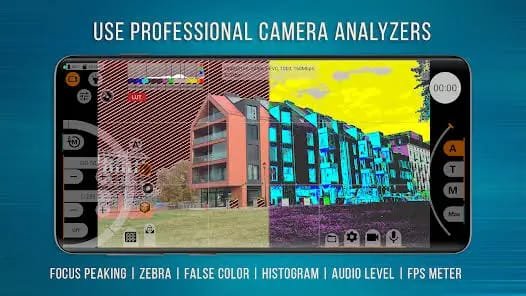
Focus peaking. This highlights the areas of a shot that are currently in sharp focus, making manual focusing considerably more reliable than guessing based on a small phone screen alone — especially useful for anyone shooting with a shallow depth of field where precise focus really matters.
Combined, these tools bring a meaningful chunk of what a proper video camera setup offers into an app running on hardware most people already own.
What This Actually Means for Everyday Creators
None of this requires a film school background to use effectively. The app is built around giving you access to these controls, not forcing you to master them all before shooting anything usable. Someone shooting a reel or a short YouTube video can start simply by locking the frame rate to 24fps and letting the rest default, then gradually explore manual shutter speed or log profiles as they get more comfortable with what each setting actually changes.
For anyone serious about improving the visual quality of their video content without investing in a separate camera setup, the combination of 24fps shooting, manual exposure control, and log color capture covers most of what separates amateur-looking phone footage from something that reads as intentionally, professionally shot.
Closing Thought
A lot of what makes footage look cinematic comes down to a handful of technical choices most phone cameras never expose to the person actually holding the camera. MCPro puts those choices — frame rate, shutter speed, color profile — directly in your hands, turning a phone that’s normally locked into automatic settings into something closer to a genuine filmmaking tool. For creators who’ve felt like their videos are missing that certain look without quite knowing why, this is usually where the difference actually comes from.
FAQs
Why does 24fps look more cinematic than the standard 30fps most phones shoot at?
24fps produces a specific amount of natural motion blur that closely matches what our eyes are used to seeing from decades of traditional cinema, which is why it reads as “movie-like” even to viewers who can’t explain the technical reason.
Do I need any filmmaking experience to use MCPro effectively?
No, you can start simply by shooting at 24fps with default settings and gradually explore manual controls like shutter speed or log profiles as you get more comfortable.
What is the 180-degree shutter rule, and why does it matter?
It’s a filmmaking principle where shutter speed is set to roughly double the frame rate, producing a natural, comfortable amount of motion blur rather than footage that looks too sharp or too smeared.
What does shooting in a log color profile actually do?
It captures a flatter, less contrast-heavy image that preserves more detail in shadows and highlights, giving you more flexibility when color grading the footage afterward.
Do I need special equipment to use the anamorphic lens feature?
Yes, this feature works with anamorphic lens attachments to produce that wide, letterboxed look with horizontal lens flares associated with big-budget films.
Is MCPro available for iPhone as well as Android?
This app is built specifically for Android, so iPhone users would need to look for a comparable manual camera app on iOS.
Can I still use MCPro for simple, everyday videos, or is it only for serious filmmaking?
Yes, it works fine for everyday use too. Locking the frame rate to 24fps alone already gives casual videos a noticeably more polished look, even without touching the more advanced manual settings.
Conclusion
A lot of what makes footage look cinematic comes down to a handful of technical choices most phone cameras never expose to the person actually holding the camera. MCPro puts those choices — frame rate, shutter speed, color profile — directly in your hands, turning a phone that’s normally locked into automatic settings into something closer to a genuine filmmaking tool. For creators who’ve felt like their videos are missing that certain look without quite knowing why, this is usually where the difference actually comes from.
